
Cook now
Every recipe you’ve saved, sorted honestly against what’s actually in your kitchen right now — no recipe hidden to make your kitchen look more stocked than it is.
The three tiers
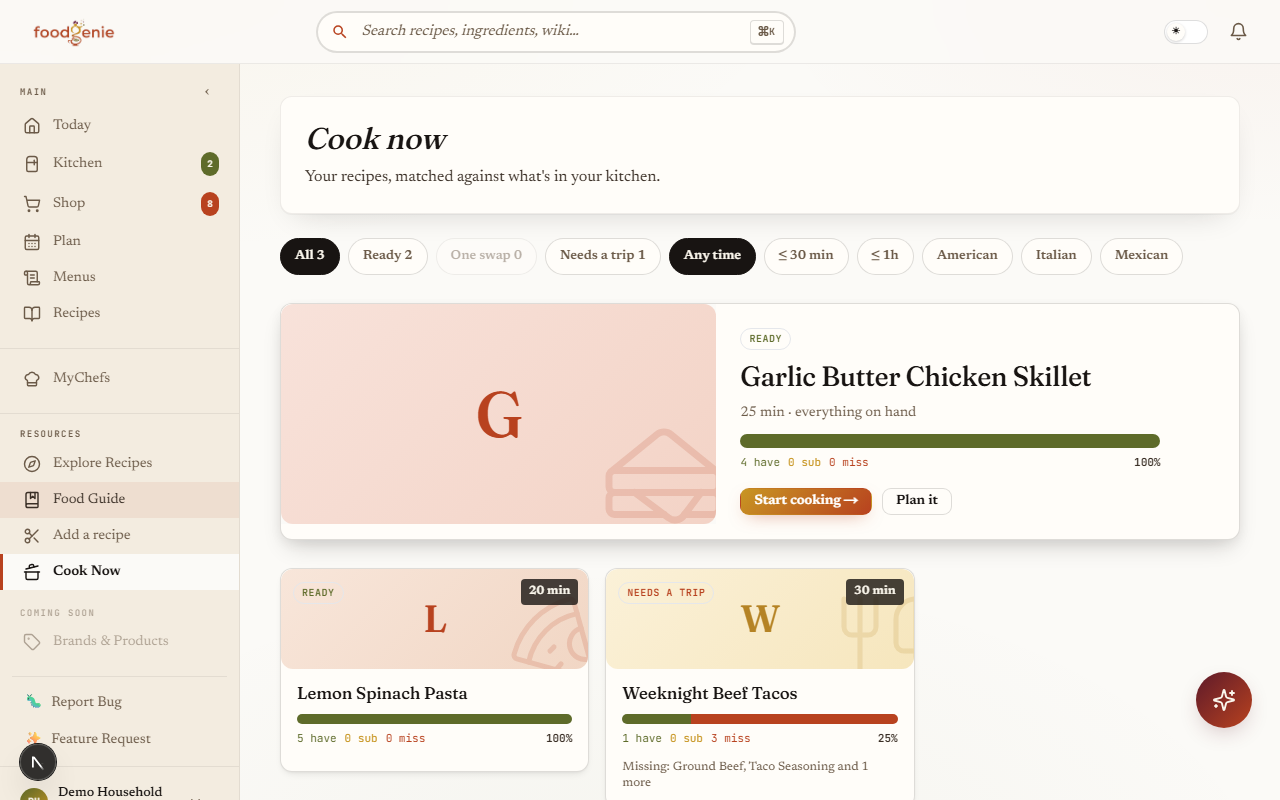
Open Cook Now and every recipe you’ve saved sorts into one of three honest groups:
Ready
Every required ingredient is already in your kitchen.One swap
Nothing is missing, but at least one ingredient needs a substitution or a close-enough version you already have.Needs a trip
At least one required ingredient isn’t in your kitchen at all.
Optional ingredients and “to taste” lines never pull a recipe down a tier — a missing pinch of salt can’t knock a ready recipe out of the Ready tier.
Match badges
Every recipe card carries a three-segment match bar — have, swap, and missing — with its match percentage, plus a corner tier badge — “Ready,” “One swap,” or “Needs a trip” — plus plain-language lines when relevant — “Swap: butter → margarine” or “Missing: flour, baking soda,” each capped at two named items before switching to “and N more.”
“One swap”
Any recipe in the “One swap” tier gets a small “One swap” badge on its card.
Inventory accuracy
Matching checks whether an ingredient is in your kitchen at all — it doesn’t weigh how much you have. A single clove of garlic counts exactly the same as a whole braid.
Use It Up
Cook Now doesn’t have its own “show me recipes for this one ingredient” filter — that link lives on Explore instead, reached from the Meal Planner’s Use It Up chooser (guide 3) when a food you’re about to lose is edible on its own.
Was this page helpful?